

Why Materialized Lake Views?
Data engineers often spend too much time orchestrating pipelines instead of transforming data. Microsoft Fabric’s new Materialized Lake Views (MLVs) change that. They let you declare transformations in SQL, and Fabric automatically takes care of persistence, refresh scheduling, lineage, monitoring, and even data quality validation.
Microsoft describes MLVs as “declarative pipelines” for your Lakehouse — you say what you want, and Fabric handles the how.
Unlike traditional pipelines where you must build orchestration, error handling, and quality checks yourself, MLVs integrate these concerns by design. With simple SQL constraints, you can enforce data quality rules (drop invalid records or stop the pipeline on violations), and Fabric automatically generates reports and lineage insights to monitor them.
We explored this functionality in detail and compared it with our Fabric Ignite Framework, which uses dbt for transformations.
Both approaches aim to deliver trusted, analytics-ready data, but they differ in setup effort, flexibility, and governance model.
This blog gives a high-level walkthrough of MLVs and their comparison with dbt.
For those who want to follow our step-by-step setup and technical test scenarios in detail, we’ve made the full technical documentation available 
How MLVs Work?
- Defined using SQL in notebooks or the UI (PySpark support is planned).
- Results are stored as Delta tables in OneLake, optimized for Power BI Direct Lake.
- Automatic lineage tracking and dataflow orchestration — no manual pipeline setup needed.
- Built-in data quality checks via constraints:
ON MISMATCH FAIL → stop pipeline execution.
ON MISMATCH DROP → skip invalid rows but continue the pipeline execution.
Example: From Bronze to Gold
Using the AdventureWorks dataset, we implemented a classic Medallion architecture with
MLVs
· Bronze: raw CSVs (sales, addresses, credit cards, persons).
· Silver: cleaned & enriched views, e.g.
addresses → adds State and Country names.
creditcards → joins holder name from person table.
· Gold: aggregated orderheaders, combining sales data with enriched addresses and credit card info.

Monitoring & Data Quality
· The lineage view in Fabric shows dependencies between MLVs and generates an executable pipeline.
· Refreshes are smart: if no source data changed, the run is skipped. (Currently full refresh only; incremental refresh is on the roadmap.)
· Built-in monitoring via:
sys_dq_metrics table → dropped records, violations per constraint.
Auto-generated Data Quality Reports → overview and detail by MLV.

Benefits of MLVs
MLVs are created entirely either in Fabric’s UI either as an SQL query in a Notebook. Fabric handles all the backend processing for you (Refresh logic, Pipeline Management based upon depencies between MLVs and their Sources, handling of Data Quality Rule violations, Scheduling, Monitoring & Reporting).
Analysts and Data Professionals just need to define what they want in an SQL query (Transformations, Aggregations, Data Quality Rules and Actions, …), without having the need of additional Infrastructure and/or Engineering Skills.
They fit completely into Microsoft Fabric’s ecosystem without requiring manual development work and/or a complex Setup.
MLVs are materialized, meaning their content is physically stored and can be queried much faster than standard Views. An efficient Refresh Logic (only MLVs with changes in source data are refreshed) reduces processing time and cloud resource costs. (Note: Currently supports full refresh or no refresh; incremental loading is planned in future updates.)
Limitations Today
This is a first version of MLVs, several features are still on the roadmap for future Releases (such as Declarative syntax support for PySpark (where currently only SQL can be used), Incremental Refresh Capabilities, API support for managing MLVs, Cross-lakehouse Lineage and Execution features, … ). Some restrictions apply on the usage of Functions and Pattern search with operators such as LIKE or regex in Constraint conditions.
A lineage of consecutive Materialized Lake Views is required in order to make sure the DataFlow/PipeLine is generated correctly; other types of Transformations will not be taken into account. Source Tables should also be loaded using another type of Transformation (and using its own PipeLine); loading them is not a part of the MLV DataFlow/Schedule. Only one MLV DataFlow/Schedule exists, including all MLVs, even if they are not related to each other. No possibility exists in order to split the MLV DataFlow/Schedule in for example Subject Area’s.
Failing Data Quality Checks result in one of the following actions : either drop the Records with a failing Data Quality Check, either stop the Execution of the MLV and its subsequent MLVs. However, these 2 types of actions are monitored differently (the MLV Runs in the Lineage will only show failing Execution of the MLVs due to DQ Errors while the sys_dq_metrics Table will only show the Number of Dropped Records during an MLV Execution) making it harder to follow this up.
Neither a Testing framework, neither Git integration is currently avalaible.
Outlook
Materialized Lake Views are still young, but Microsoft is evolving them rapidly. Incremental refresh and PySpark support are already on the roadmap. Deeper integration with Purview, Git, and APIs are currently missing.
Today, MLVs are already an excellent choice for fast delivery of curated datasets in Fabric, especially when combined with Power BI Direct Lake.
Looking ahead, we expect MLVs to become even more powerful with capabilities such as:
- Smarter incremental processing
- Richer built-in data quality and testing
- Full Git-based collaboration and CI/CD support
- Cross-lakehouse lineage for enterprise data mesh
- Performance optimizations with adaptive refresh and caching
These innovations will elevate MLVs from a low-code enabler to a strategic enterprise solution for advanced analytics engineering.
Fabric Ignite Framework with dbt versus Fabric Materialized Lake Views
In our Fabric Ignite framework, we rely on dbt for managing transformations. dbt gives us advanced testing, Git-based workflows, and mature incremental refresh capabilities – features that data engineers love when building complex, governed pipelines.
With the arrival of Materialized Lake Views (MLVs) in Fabric, we now see a compelling alternative for certain scenarios. MLVs shine when you want fast delivery of curated datasets, minimal setup, and Fabric-native governance while dbt remains stronger for incremental models, advanced testing, and CI/CD best practices.
In practice, many organizations will likely combine both approaches: using MLVs for low-code, Fabric-native workloads, while leveraging dbt where engineering complexity, portability, and DevOps practices are essential.
Comparison between MLV and dbt:
Feature / Need | Materialized Lake Views (MLV) | dbt |
Setup time | Minutes, fully in Fabric UI | Requires dbt Core/Cloud setup, Git repo, configs |
Incremental refresh |
|
|
Governance integration |
| Partial — needs extra integration |
Dependency handling |
|
|
Testing framework |
|
|
Version control |
|
|
Cross-platform |
|
|
Learning curve | Low (SQL-focused) | Higher (YAML, Jinja, CLI, Git) |
Best for | Simple-to-medium transformations in Lakehouse, fully Fabric-managed | Complex, engineered transformations, CI/CD, multi-platform |
 (full refresh only, incremental planned)
 Native incremental models
Use Case
A Use Case was set up following the medallion architecture by organizing data into three layers :
- bronze (raw data)
- silver (cleaned and enriched data)
- gold (aggregated and analyzed data).
Some tables from the AdventureWorks 2008 OLTP Schema (a sample database for Microsoft SQL Server) will be used as source for this Use Case. These Tables were downloaded as CSV files and loaded as Delta Table in a Bronze Layer of Fabric:
Table | Description | Delta Table in Bronze Layer Fabric |
Sales.SalesOrderHeader | General sales order information. | adventureworks_bronze. salesorderheader |
Person.Address | Street address information for customers, employees, and vendors. | adventureworks_bronze. address |
Person.StateProvince | State and province lookup table. | adventureworks_bronze. stateprovince |
Person.CountryRegion | Lookup table containing the ISO standard codes for countries and regions. | adventureworks_bronze. countryregion |
Sales.CreditCard | Customer creditcard information. | adventureworks_bronze. creditcard |
Sales.PersonCreditCard | Cross-reference table mapping people to their credit card information in the CreditCard table. | adventureworks_bronze. personcreditcard |
Person.Person | Human beings involved with AdventureWorks: employees, customer contacts, and vendor contacts. | adventureworks_bronze. person |
The Bronze Layer DataModel:

Note : The above Table RelationShips were added to the Data Model after the MLVs (see next steps) were created in order to make the DataModel more visual. They are not necessary and/or used by Fabric in order to set up the MLVs.
In the Silver Layer 2 enriched/cleaned tables will be set up. They are created as Materialized Lake Views:
- addresses – All addresses in source table address will be enriched with the StateProvince Name and CountryRegion Name retrieved from the appropriate source tables.
- creditcards – All credit cards in source table creditcard will be enriched with the name of the credit card holder, derived from the persons source table.
In order to demonstrate the Built-in Data Quality capabilities of MLVs some Constraints are defined:
- addresses – All addresses must have a StateProvince Name and CountryRegion Name. If they cannot be derived from the appropriate source tables the MLV must not be updated, and the PipeLine must stop with a failure.
- creditcards – All credit cards must have a Number, Expiry Month and and Expiry Year. If they cannot be derived from the appropriate source table the MLV these credit cards must not be included in the MLV, however the execution of the PipeLine can continue.
Creation Scripts for the MLVs in the Silver Layer in Fabric:
Remark: the attributes used by constraints must be defined in the Select statement. In the above example both Bill_To_AddressId and Ship_To_AddressId are only added for the usage by the constraint, they have no Business Value. However, referring to bta.AddressID or sta.AddressID in the Constraints will result in a failure).
Once the MLVs are created, a Data Lineage View is autogenerated. In order to access this View, navigate to the LakeHouse and select Managed Materialized Lake View:

MLVs themselves are also stored as Delta Tables, and can be found as such in the Tables Section of the LakeHouse.

This autogenerated Lineage can be scheduled as a PipeLine.
Note however:
- Only MLVs are refreshed. Refreshing Data in the Delta Tables in the Bronze Layer in the above example has to be done in a different way, and cannot be integrated in the autogenerated PipeLine. The same applies if for example other Data Tables in one of the Layers should have to be manipulated.
- All MLVs, even if they are not related to the same Data Lineage, will be part of the same Data Lineage View/PipeLine. The top part of the Data Lineage shown below is the one for the Use Case used in this Blog, the below part is another Use Case. Both do not share any object with each other.
 Select Schedule from the navigation ribbon in order to create and/or maintain the Scheduling of the MLV PipeLine:
 The DropDown Menu top left lists the current and historical runs, and should be used to Monitor/Troubleshoot the executions of the PipeLine.
Clicking on an Activity in the Lineage Part of the Screen or on the Activity List in the bottom of the Screen will show more details on Execution/Errors/…
Notes:
- All MLVs are in the same PipeLine (see earlier note). All MLVs without Input dependency from another MLV are started simultaneously, and from this point on will the dependencies determine the path to follow.
- No trace of dropped records due to Data Quality Constraints can be found on the Activities; they will be considered as Completed without any warning or indication.
Scenarios
For the Use Case a number of scenarios will be set up to demonstrate the different functionalities of the MLVs.
The data as provided by Microsoft for the AdventureWorks 2008 OLTP Schema do not contain any discrepancies to the specified Data Quality Rules:
- All OrderHeader records have a Bill_To_AddressId and a Ship_To_AddressId.
- All Addresses can be linked to a StateProvince Name and a CountryRegion Name.
- All Credit Cards can be linked to a Person.
Initial Data Quality Checks:
Scenario #1
This is the Initial Load, with no discrepancies in the Data Quality (see above).
The MLVs Schedule runs successfully:

The sys_dq_metrics Table can be used in order to monitor the number of records loaded. It refers to system-level data quality metrics, which are used to measure and monitor the quality of data in a database or data pipeline. These metrics help ensure that data is accurate, complete, consistent, and reliable for decision-making.
In this Table the following records refer to Scenario #1:
The Total Rows Processed for each MLV matches the number of records in their Driving Tables (salesorderheader, address and creditcard in the Bronze Layer).
No rows were dropped, no violations were found.
Scenario #2
Without changing anything to the content of the Bronze Layer, the MLV Schedule is started again.
The MLVs Schedule runs successfully:
In the sys_dq_metrics Table the following records refer to Scenario #2:
The Total Rows Processed for each MLV is 0. No rows were dropped, no violations were found.
The System detects that no changes were made to the Source Data used by the MLVs. The RefreshPolicy is ‘NoRefresh’, and the Message is ‘No data update in the source table on which the MLV depends and hence no refresh was done’.
This proves only the parts of the lineage that have changed will be refreshed. Please note however that currently no incremental loads are supported; either a full refresh of the MLV will happen, either no refresh.
Scenario #3
We will enforce a Data Quality Issue by updating a CountryRegionCode in the countryregion Tabel in the Bronze Layer. This will result in an empty CountryRegion in the addresses MLV in the Silver Layer, violating the Constraint countryregion_chk in that MLV.
The following Data Manipulation Language (DML) SQL statement is executed in order to enforce the Data Quality Issue:
- The MLVs Schedule does not run successfully:

- The creditcards MLV will run successfully;
- The addresses MLV fails due to the violation of the Constraint countryregion_chk in that MLV while the ON MISMATCH Parameter for this Constraint is set to ‘FAIL’. The Error Log shows:
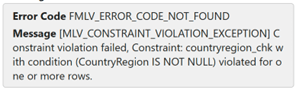
- The PipeLine stops due to the Data Quality Violation; the orderheaders MLV will not run…
The sys_dq_metrics Table does not contain any records for MLVs that failed or did not run, so the only entry for Scenario #3 is:

Remark:
Failing Constraints seem to be time-consuming. During my tests the failing MLV addresses took more than 5 minutes:

… where the ‘initial load’ (Scenario #1, loading 19.614 addresses) took only 43 seconds. Earlier tests with the same MLV showed similar results (> 5 minutes in case of Constraint Violations):

Scenario #4
We will solve the CountryRegionCode Data Quality Issue again, and enforce another Data Quality Issue by updating the Expiration Monthe in the creditcard Tabel in the Bronze Layer (all Expiration Months 1 will be changed to null). This will result in an empty ExpMonth in the creditcards MLV in the Silver Layer, violating the Constraint expirationmonth_chk in that MLV.
The following Data Manipulation Language (DML) SQL statements are executed in order to enforce the Data Quality Issue:
The MLVs Schedule runs successfully:

The creditcards MLV does not fail due to the violation of the Constraint expirationmonth_chk in that MLV while the ON MISMATCH Parameter for this Constraint is set to ‘DROP’. The only place where you can see the ‘dropped records’ is the sys_dq_metrics Table. It does contain the number of Violations / Dropped Records, and the Number of Records by failing Constraint for Scenario #4:
- The Number of Records in MLV creditcards in the Silver Layer = 17.505 (being 19.118 Records in the Bronze Layer Source Table creditcard minus 1.613 ‘failing’ Credit Cards (due to a missing Expiration Month)).
- The orderheaders MLV does not miss any records; the SQL Code for this MLV contains a Left Outer Join to the creditcard MLV, and no Data Quality Constraints were defined in the orderheaders MLV related to Credit Cards;
- Unlike the Constraints with an ON MISMATCH parameter ‘FAIL’, the MLVs with an ON MISMATCH parameter ‘DROP’ apparently take little to no extra time…
MLV Data Quality Reports
On the ribbon of materialized lake views page a Data quality report button can be found.
By pressing this button an autogenerated data quality report is opened, containing both an overview page and a detail page: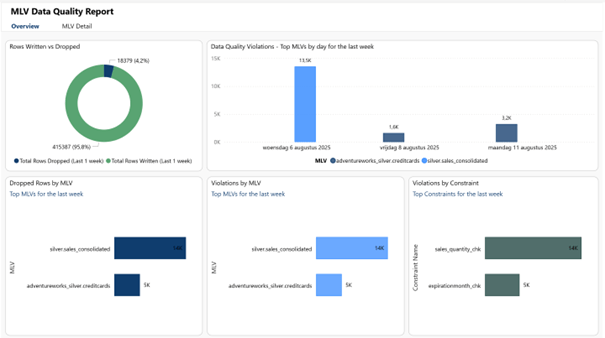

While the Overview page summarizes all data from all MLVs, the Details page allows you to focus on one or more MLVs.
Remark:
These Reports do NOT take into account the failing MLV executions due to the ON MISMATCH Parameter on an MLV Constraint set to ‘FAIL’; they only focus on ON MISMATCH Parameters set to ‘DROP’. This means that neither the Data Quality Reports, neither the sys_dq_metrics Table will show the impact of blocking Data Quality Issues!!!